WhatsApp Beta for Android Introduces Sticker Photos in Status Updates

WhatsApp continues to refine its status update features, bringing them closer to Instagram’s dynamic storytelling tools. With the latest WhatsApp beta for Android (2.25.5.20), a fresh addition is making waves—sticker photos for status updates. This feature allows users to overlay images onto their statuses, adding a more engaging and creative touch to their shared moments. But why is this significant? To understand WhatsApp’s shift, let’s look at the evolution of status updates across platforms.

From Plain Text to Interactive Visuals: The Status Update Evolution

Once a simple text-based feature, WhatsApp’s status updates have transformed into a multi-media-rich experience. Inspired by Snapchat and Instagram Stories, WhatsApp introduced image and video status updates years ago, but creativity was limited. Unlike Instagram, where users could layer stickers, GIFs, and additional media onto their stories, WhatsApp primarily allowed users to post separate images or videos without much personalization. The new sticker photo feature represents a major leap forward, allowing users to customize their status updates like never before.

What’s New? How the Sticker Photo Feature Works

With the latest beta update, some users can now:

  • Overlay additional images on photos or videos in their status updates.
  • Choose from predefined sticker shapes, including rectangles, circles, squares, hearts, and stars.
  • Resize and reposition sticker photos for more creative freedom.
  • Create structured layouts using rectangular stickers, perfect for collages and visual storytelling.
  • Use heart and star-shaped stickers to highlight romantic moments or special occasions.

This functionality mirrors Instagram’s content sticker, allowing for a layered storytelling approach where multiple images can be placed within a single status update rather than uploaded separately.

WhatsApp beta for Android 2.25.5.20

A More Interactive Status Experience? Why This Update Matters

  • More Personalization – Users can now express emotions, highlight key moments, and create themed status updates more flexibly.
  • Better Storytelling – Users can now consolidate their memories into a single, engaging visual post instead of posting multiple updates.
  • A Step Closer to Instagram & Snapchat – WhatsApp is aligning itself with the visual creativity of competing platforms, making its status feature more interactive and engaging.
  • Potential for Business Use – Brands, influencers, and businesses on WhatsApp can use sticker photos to create mini-promotions, event highlights, or storytelling-based updates, making their content more engaging for customers.

Who Gets It First? Beta Testing & Wider Rollout

This feature is available for select beta testers who have updated to WhatsApp beta 2.25.5.20 on Android via the Google Play Store. WhatsApp plans to expand access in the coming weeks, meaning more users will soon get to experiment with this new status customization tool.

A Step in the Right Direction?

WhatsApp has often been cautious with feature rollouts, preferring functionality over flashy additions. However, with increasing competition from Instagram, Snapchat, and Telegram, this update suggests WhatsApp is ready to embrace richer visual communication. But will users embrace this change and use sticker photos creatively? Or will WhatsApp need further refinements to match Instagram’s more dynamic sticker capabilities?

Read More: WhatsApp to Introduce Viewer Count for Channel Updates on Web Client

WhatsApp Enhances AI Accessibility with New Home Screen Widget

Meta’s commitment to making artificial intelligence practical and easily accessible across its platforms continues to grow, and WhatsApp is becoming central to this strategy. Following recent innovations in chatbot technology and conversational AI integration, WhatsApp is taking another step forward by introducing a dedicated Home Screen widget designed specifically for Meta’s AI chatbot, as reported by WABetaInfo.

This upcoming widget signifies WhatsApp’s deeper integration with AI-driven services, showcasing a shift toward convenience and seamless user interaction. With this new widget, users will have immediate, direct access to the Meta AI chatbot right from their device’s Home Screen, completely bypassing the traditional method of manually searching through the app.

WhatsApp’s decision highlights a clear objective simplifying interactions and saving time. Interestingly, WhatsApp is developing this widget with a universal user experience in mind, ensuring both Android and iOS users receive identical functionality and ease of use, reflecting a broader push toward unified AI experiences across platforms.

Moreover, the widget includes three practical shortcuts, each catering to specific and frequent interactions with Meta AI. The first shortcut facilitates instant question-and-answer interactions, significantly reducing response time. The second shortcut enables quick image-sharing capabilities directly from the user’s Home Screen, promoting effortless multimedia interactions with AI. Lastly, a voice-chat shortcut allows users to engage with Meta AI using voice commands, reflecting WhatsApp’s increasing focus on voice-driven interactions as typing becomes less preferred by many users.

WhatsApp Home Screen update

In essence, this widget represents more than just an incremental update. It demonstrates WhatsApp’s strategic pivot towards deeper integration with AI, reshaping how millions interact with technology daily. For users, it means greater convenience; for Meta, it emphasizes their ambition to become leaders in practical AI accessibility across their family of apps.

Read More: OpenAI Blocks Accounts in China & North Korea Over Misuse

WhatsApp Rolls Out Permanent Chat List Filters for Easier Navigation

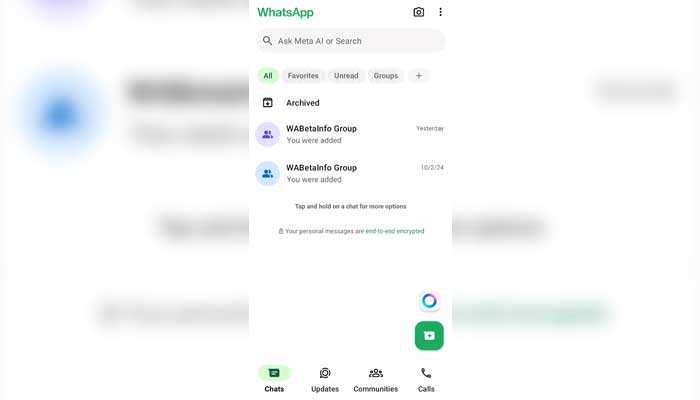
WhatsApp, the popular messaging platform Meta owns, has introduced a significant user interface (UI) update, ensuring that chat list filters remain permanently visible for seamless access. This update is rolling out to select beta testers and will reach more users in the coming weeks.

A Permanent Place For WhatsApp Chat List Filters

Until now, users needed to scroll through their conversation list and find chat filters manually. From now on, filters will be pinned to make it easier for users to switch to unread messages, personal chats, work chats, and group chats without scrolling too much across the hidden navigation functions.

This screenshot shows the new WhatsApp update. — Techi

New UI Update Improves WhatsApp Chat Navigation

The latest WhatsApp update makes chat management easier by enabling you to check your unread messages across various filters in real time, as shared by WABetaInfo. This means that users no longer have to scroll through the chat list to check for new messages.

Better Organizing Your Chats — for Personal and Business Users

This feature will help greatly improve workflow efficiency for businesses and professionals that have to deal with multiple chat threads. This allows users to organize better and respond to chats based on the category they fall in, ultimately reducing wait times.

Early Access to WhatsApp Beta Users

Other beta testers may notice as well that the ‘Favourites’ filter is being automatically placed before secondary filters. This change enables users to pin their most important contacts as favorites for easy access without any manual reordering required.

When Will the New WhatsApp Feature Be Live?

Users who want to try out this new feature will need to download the WhatsApp beta for Android 2.25.4.12 update from the Google Play Store. The update is gradually rolling out to a wider audience over the coming weeks. The constant UI improvements in WhatsApp are proof of their commitment to providing a better user experience and helping users navigate chats without any hindrances while keeping that experience tailormade for both personal as well as professional users.

Read More: Apple to Bring AI Features and Spatial Content App to Vision Pro